Iphone 5s

Wednesday, 12 October 2011

Apple AirPrint Wireless Beta for iPad, iPod Touch and iPhones


Apple announced the release of its AirPrint Wireless Beta for iPad, iPhone and iPod Touch devices. The AirPrint Wireless Beta will only be available to Apple iOS Developer Program members and will be included in the next free iOS 4.2 software update which is scheduled for November.

If you are not sure what AirPrint does, it is Apple’s powerful new printing architecture that matches the simplicity of iOS—no set up, no configuration, no printer drivers and no software to download. It has the ability to automatically detect printers on the near local networks, and print text, photos and graphics on them via WiFi connectivity. The ePrint enabled printers by Hewlett Packard will be the first devices that will support “printing detect” on the iOS devices by Apple.

Apple iPod Touch 4G comes with a Camera

Apple has officially announced the new iPod Touch 4G that comes with two cameras, one at the rear that is capable of recording 720p HD videos and a front camera for FaceTime video conversation with friends. The new device measures just 7.2mm thick that makes it much thinner than the previous versions. It comes with a 3.5-inch Retina Display with a 960×640, its kinda like the simplified version of the iPhone 4, but take away the Phone function, 3G data and add less advanced cameras.

Tuesday, 11 October 2011

A Simple Easy to use Model Release App for Photographers
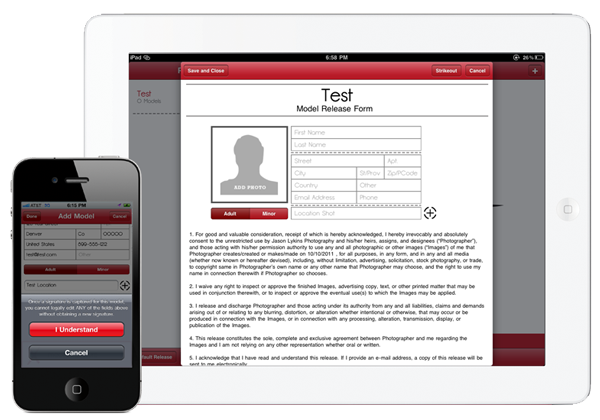
A Simple Easy to use Model Release App for Photographers
If you're a photographer, you should use a model release. Done deal. No doubt about it. No question. In the past (before smartphones) I carried a stack of paper model releases with me in my camera bag along with a bunch of pens. Whenever I shot ANY person (I do mean anyone), I would have them, or if they were under 18 their parents, sign a physical model release. This was a pain in the butt, not only to physically carry them, but also to organize and store them. With the invent of the smartphone and later the iPad, the need to keep physical model releases is no more. Up until recently, I was using a release App that was sufficient but also very tedious and had a little "too many" features. I wanted a model release App that was simple, strait to the point, and easy to use. Release Me answers that need better than any other I've found.


Make it Easy
My biggest complaint with many of the other model release Apps has always been that there was so much to fill out on a shoot by shoot basis that it took up way too much time. I shoot primarily people, I shoot in the USA always, I don't have multiple studio names or brands, and I almost always give the model copies of the images for their own portfolios. With previous Apps, I would have to select or enter each of those things above that almost NEVER changed. Release Me has made this process simple. I fill out (before hand) my standard model release, I enter the model's information, take a picture of them, have them digitally sign it, and I'm done. Of course there are more options if you want to exercise them, but they are either not options that are incredibly important for every shoot, or they are options (like emailing the completed release) that can be performed at a later time.  It doesn't get much simpler than this.
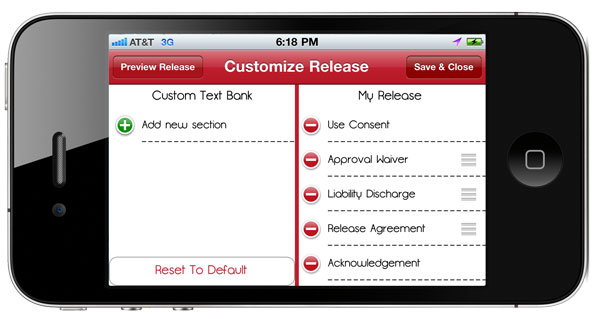
I mentioned that the "standard" model release is filled out before hand to save time while you are working with the model. Built right into Release Me is an industry standard model release form. for 99% of the shooters out there, this is all that you need. It covers you, your rights, the model and their rights. It has a place for minors and their parents and is legally binding.  For the other 1% of shooters that require more intense or specific language in their release, there is the option of adding in additional language. this language can be anything you would like, however I would suggest talking to a lawyer before adding anything to any legally binding document.  On the opposite side of this is the strike out feature. If there is language that the subject doesn't feel comfortable with, and you both agree to remove it from the release you can strike it from the document. Once the document is signed by the model, the information contained cannot be altered without a new signature.

See Who Signed and Where You Were
Another helpful feature that Release Me contains is the Map View. This Allows you to either manually enter the location where you photographed the subject, or use the built in Maps App to locate and place a pin where you are shooting. This is a very handy feature, especially if you have a multi-shoot project going on that spans multiple days and locations. The Other useful, and almost required feature is the photo section. Use your device's built in camera to take a photograph of the model that is going to be signing the release. Personally I think this is a required feature for a release App. 

Sign Your Screen
This seems like a "duh" comment or feature, but the ability to sign the screen is so incredibly nice. No more carrying pens. No more physical forms… If you've never used physical forms, I don't know that you can truly grasp how nice of a feature this is. Just suffice to say that it has saved a ton of trees and me from growing grey hair prematurely.

One thing that Terry and I have both found, is that signing the screen with your finger is cumbersome and a little clumsy. We both prefer a stylus designed for use on touchscreens. They can be bought for $15-$30 from many brand name manufacturers such as Targus and Pogo.


The Bottom Line
This is one of, if not the simplest model release Apps that I have used. If you want a no nonsense, easy to use model release App, Release Me is for you. Their motto rings very true "it's better to have one and not need it, than need it and not have one". If you're taking photographs of people, get a release. You never know when that person might become famous, notorious, or otherwise profitable to have photographed.


Facebook for iPad. It’s here!


It is here. After a long time coming, Facebook has finally released their native iPad app which comes as a universal bundle. If you are not familiar with the terms, this means that the current iPhone app is now updated to allow support for iPad. Just check for updates in iTunes and version 4.0 will include the iPad app and the updated iPhone app in one. Although there is a lot that has changed in the iPhone app, I’m focusing on the iPad app today.

Interface
While using a browser and the normal Facebook version has been OK, the interface of the new iPad app far exceeds what you previously have been able to get using any official or third-party solution. They have clearly spent a considerable amount of thinking when designing the interface because it looks gorgeous and functions really well.

Facebook has always put out great interfaces on their mobile apps at launch but then been far to slow to update the app afterwards. Glad to see they are not disappointing when it comes to the interface. We’ll just have to wait and see about the updates, but I wouldn’t hold my breath.

It Lacks Features…
First thing’s first. There are some good things. It has become very easy to access your different pages and groups from a nice navigation menu that slides out when you swipe your finger across the screen. Additionally, accessing photos as well as games has become very easy, something Facebook themselves are touting with this app.

Unfortunately, the app clearly lacks features! As an example there is no sharing from the iPad app, only commenting and liking. There are other small features here and there that makes the iPad app (and the iPhone app too since it looks and functions the same) just a dumbed down version (albeit good-looking) of the website. It is unfortunate that they have decided to leave just a little bit out, instead of adding it too. After all, we are talking features that Facebook are highlighting well on the main site.

Conclusion
Facebook has come out with a great app and there is no reason not to get it and play with it. It far exceeds any other option in terms of looks and apart from opening the Facebook site in your browser, it beats the other options in functionality. It would be great if they tried to match the features found in the iPad app and on the site, especially given how many use the iPad as their “main Facebooking device”.

Monday, 10 October 2011

iPhone 4S sticks with 512MB of RAM, reports say


Despite a number of improvements to the hardware within the upcoming iPhone 4S, it's looking like one component that will remain the same is the amount of built-in memory.MacRumors this morning points to a report from China-based AppVV.com, which seems to have gotten its hands on an iPhone 4S ahead of Friday's launch. The site has posted photos and videos of the device in action, including the new Siri voice assistant.
In a post over the weekend, the person with the device also notes that the device is packing 512MB of RAM versus the 1GB some had been expecting. That adds to comments made last week by the developer of the upcoming iPhone 4S-centric game Infinity Blade 2, who in an interview with Eurogamer floated the 512MB number as well.
In the days ahead of the iPhone 4S' unveiling, a report from 9to5mac correctly detailed many of the details about the Siri application that's launching as an iPhone 4S exclusive, while adding that there would be 1GB of RAM to help support the feature.
While Apple has been eager to tout the technical specifications of the iPhone 4S in comparison to its predecessor, the company has not broken with the tradition of not disclosing the amount of built-in RAM in iOS devices. RAM increases in devices like the iPhone 4 and iPad 2 have led to noted improvements in multitasking, as well as keeping more Web pages open in Safari on both of these devices.
An Apple spokeswoman declined to comment on the amount of RAM in the 4S following last week's unveiling, saying only that all of the phone's specifications to be shared were listed on the company's product page.
We're likely to get the full skinny, including a look at the innards of the 4S at the end of the week, as is usually the case with popular gadgets through the like of iFixit and CNET sister site TechRepublic. The new phone goes on sale at 8 a.m. Pacific on Friday both at Apple Stores and through its carrier partners. Earlier today Apple said it received more than a million preorders for the new phone in the first 24 hours it was available for sale, saying it's been the most successful early sales run of a product in the company's history.


Dual-core A5 chip. The most powerful iPhone processor ever.

Dual-core A5 chip.
The most powerful iPhone processor ever.

Two cores in the A5 chip deliver up to two times more power and up to seven times faster graphics.2 And you’ll feel the effects. Fast. iPhone 4S is quick and responsive, which makes all the difference when you’re launching apps, browsing the web, gaming, and doing just about everything. And no matter what you're doing, you can keep on doing it. Because the A5 chip is so power-efficient, iPhone 4S has outstanding battery life.

The you-can’t-believe-it’s-on-a-phone camera.


The iPhone 4S camera gives you 8 megapixels — that’s 60 percent more pixels than the camera on iPhone 4. And they’re engineered with a higher, full-well capacity to collect even more light. With more megapixels and more light, you’ll see a dramatic difference in the resolution and details of your images.

Video recording. In 1080p amazing HD.

Shoot stunning 1080p HD video everywhere you go. With all-new optics, the light is always right, the color is always vivid, and everything will look even better than you remember. Video stabilization steadies shaky shots. And you can edit video right on iPhone and share your lush life as fast as you shoot. 

iphone 5


DUal_core
A5 chip 
up to 2x faster
performance and 7x faster graphics.